SeedVR2 Upscaler (upscale_seedvr2)
Sequence · Diffusion-transformer video super-resolution
Generative video super-resolution that hallucinates plausible high-frequency detail with temporal coherence. Built on a Diffusion Transformer (DiT) and a VAE, distilled to a single-step denoising pass.
What you give it
- A low-resolution RGB clip.
What you get back
- A high-resolution RGB clip with synthesized detail that stays coherent across time (no swimming or boiling micro-detail).
Typical VFX uses: legacy SD/HD footage uprez to UHD/4K, plate restoration on damaged or compressed elements, archival recovery, AI-generated-content cleanup.
Commercial use
| Component | License | Commercial OK? |
|---|---|---|
| SeedVR2 code (ByteDance Seed) | Apache 2.0 | ✅ Yes |
| SeedVR2-3B / SeedVR2-7B weights | Apache 2.0 | ✅ Yes |
| ComfyUI port (numz) | Apache 2.0 | ✅ Yes |
Safe for paid production work. Preserve the Apache 2.0 NOTICE in redistributions. Cite the ICLR 2026 paper.
Requirements
-
GPU VRAM (per ComfyUI port):
Variant VRAM 7B FP16 ~20–24 GB+ 7B FP8 mixed ~16–20 GB 3B FP16 ~12–16 GB 3B FP8 ~8–12 GB GGUF Q4_K_M ~4–8 GB (with BlockSwap + VAE tiling) VAE adds ~2–4 GB on top.
- ComfyUI custom node: numz/ComfyUI-SeedVR2_VideoUpscaler (NumZ + AInVFX/Adrien Toupet).
- Model weights: the embedded workflow selects a DiT checkpoint via the
SeedVR2LoadDiTModelnode (the DiT Model parameter) and a VAE checkpoint viaSeedVR2LoadVAEModel(the VAE Model parameter). The numz node downloads the selected DiT and VAE files on first use into ComfyUI’s SeedVR2 models directory — no manual download is required, though you can pre-stage them. Available checkpoints:- ByteDance-Seed/SeedVR2-3B (~6 GB FP16).
- ByteDance-Seed/SeedVR2-7B (~14 GB FP16).
- ComfyUI-packaged variants: numz/SeedVR2_comfyUI, AInVFX/SeedVR2_comfyUI.
- Low-VRAM quantizations: cmeka/SeedVR2-GGUF (Q8_0 / Q4_K_M).
- VAE checkpoint: ~2–4 GB.
Parameters
Upscaling
| Parameter | Meaning |
|---|---|
| Seed | Random seed for the diffusion process. Set to -1 for a fresh random seed each render. |
| Resolution | Target output resolution for the shorter side (e.g. 1080 upscales to 1080p), preserving aspect ratio. |
| Max Resolution | Maximum output resolution cap. 0 disables the cap. |
| Batch Size | Frames per inference batch. Larger batches improve temporal consistency but use more VRAM. Must be odd (e.g. 33). Reduce on OOM errors. |
| Temporal Overlap | Frames overlapped between consecutive batches for smoother transitions. |
| Color Correction | Method used to match output colour to the input. Options: none, lab (CIELab, recommended), hm (histogram matching). |
| Frame Limit | Maximum number of frames to load from the input sequence. 0 means no limit. |
Advanced
| Parameter | Meaning |
|---|---|
| Uniform Batch Size | Pad all batches to the same size for consistent VRAM usage. |
| Prepend Frames | Number of black frames prepended to the sequence before processing. |
| Input Noise Scale | Noise added to the input before upscaling. 0 = none. |
| Latent Noise Scale | Noise added in latent space. 0 = none. |
| Enable Debug | Enable tiling debug visualization and verbose ComfyUI output. |
VAE Model
| Parameter | Meaning |
|---|---|
| VAE Model | Filename of the SeedVR2 VAE checkpoint in the ComfyUI models directory (default ema_vae_fp16.safetensors). |
| VAE Device | Compute device for the VAE (e.g. cuda:0). |
| Offload Device | Device the VAE is offloaded to when idle (e.g. cpu). |
| Encode Tiled | Tile the VAE encoding pass to reduce VRAM usage. |
| Encode Tile Size | Pixel size of each tile during VAE encoding. |
| Encode Tile Overlap | Overlap between encoding tiles to reduce seam artifacts. |
| Decode Tiled | Tile the VAE decoding pass to reduce VRAM usage. |
| Decode Tile Size | Pixel size of each tile during VAE decoding. |
| Decode Tile Overlap | Overlap between decoding tiles to reduce seam artifacts. |
| Cache Model | Keep the VAE model loaded in VRAM between jobs. |
DiT Model
| Parameter | Meaning |
|---|---|
| DiT Model | Filename of the SeedVR2 DiT checkpoint in the ComfyUI models directory (default seedvr2_ema_7b_fp8_e4m3fn_mixed_block35_fp16.safetensors). |
| DiT Device | Compute device for the DiT model (e.g. cuda:0). |
| Offload Device | Device the DiT model is offloaded to when idle (e.g. cpu). |
| Blocks To Swap | Number of DiT transformer blocks swapped to the offload device during inference. Higher values reduce VRAM at the cost of speed. |
| Swap IO Components | Also swap the DiT input/output projection layers to the offload device. |
| Attention Mode | Attention implementation. Options: sdpa (PyTorch SDPA, default, works everywhere), flash_attn, xformers (need extra packages), math. |
| Cache Model | Keep the DiT model loaded in VRAM between jobs. |
Plus the standard ComfyUI base parameters.
Demos & comparisons
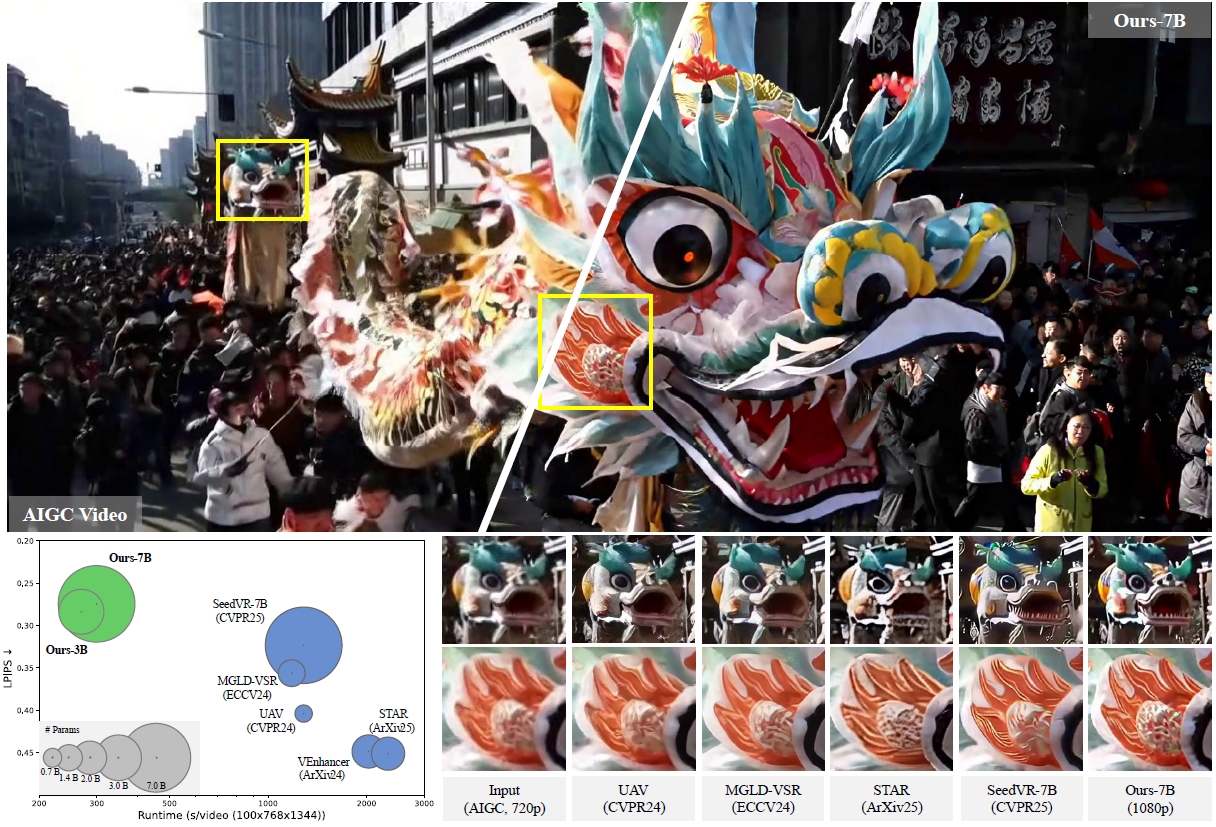 SeedVR2 result comparison. © Wang et al., ByteDance Seed, ICLR 2026. Source: iceclear.github.io/projects/seedvr2. Reproduced under Apache 2.0 attribution.
Input → output
One-step diffusion video super-resolution result. © Wang et al., ByteDance Seed, ICLR 2026. Source clips hosted on Hugging Face datasets/Iceclear/SeedVR_VideoDemos. Reproduced under Apache 2.0 attribution.
- Project page — iceclear.github.io/projects/seedvr2 — side-by-side LR input / SeedVR2 / multi-step baselines (RealBasicVSR, Upscale-A-Video, VEnhancer).
- GitHub README — ByteDance-Seed/SeedVR — degraded real-world plates restored to high resolution. Repository assets are Apache 2.0 (redistributable with NOTICE preserved).
Image attribution: Wang et al., ByteDance Seed, ICLR 2026; reproduced for documentation purposes with citation to arXiv:2506.05301. See the credits page.
Performance
- One-step inference (vs. 15–50 steps for prior diffusion VR models) — paper claims >4× speedup over multi-step diffusion VR baselines at comparable or better quality.
- Speed scales with: model size (3B faster than 7B), batch size (larger faster per-frame), torch.compile, output resolution.
- Reference setups from the official repo: 1×H100-80G handles 100×720×1280;
4×H100-80G handles 1080p / 2K via sequence parallel (
sp_size=4).
Limitations
- Heavy degradations: the model is not robust to extreme degradation or very large motion — may fail to remove the degradation or produce unpleasing detail.
- Lightly degraded input: on very clean input (e.g. native 720p AIGC), the model tends to over-generate detail, producing an oversharpened “fake-crisp” look. Use a lighter variant or a smaller upscale ratio.
- Long clips: require streaming / chunked mode to avoid OOM. The plugin’s
Image Load Capcontrols this. - macOS/MPS: BlockSwap unavailable (unified memory architecture).
- Older GPUs without bfloat16 (e.g. GTX 970-class): automatic fallback path with caveats.
Credits
Jianyi Wang, Shanchuan Lin, Zhijie Lin, Yuxi Ren, Meng Wei, Zongsheng Yue, Shangchen Zhou, Hao Chen, Yang Zhao, Ceyuan Yang, Xuefeng Xiao, Chen Change Loy, Lu Jiang. SeedVR2: One-Step Video Restoration via Diffusion Adversarial Post-Training. ICLR 2026. ByteDance Seed. Paper · Project page · GitHub
ComfyUI port by NumZ and AInVFX (Adrien Toupet).
Citation
@inproceedings{wang2026seedvr2,
  author    = {Wang, Jianyi and Lin, Shanchuan and Lin, Zhijie and Ren, Yuxi and
               Wei, Meng and Yue, Zongsheng and Zhou, Shangchen and Chen, Hao and
               Zhao, Yang and Yang, Ceyuan and Xiao, Xuefeng and Loy, Chen Change and
               Jiang, Lu},
  title     = {SeedVR2: One-Step Video Restoration via Diffusion Adversarial Post-Training},
  booktitle = {International Conference on Learning Representations (ICLR)},
  year      = {2026},
  eprint    = {2506.05301},
  archivePrefix = {arXiv}
}

@inproceedings{wang2025seedvr,
  author    = {Wang, Jianyi and Lin, Zhijie and others},
  title     = {SeedVR: Seeding Infinity in Diffusion Transformer Towards Generic Video Restoration},
  booktitle = {Proceedings of the IEEE/CVF Conference on Computer Vision and Pattern Recognition (CVPR)},
  year      = {2025},
  note      = {Highlight}
}