


We believe the future of visual effects is operator augmentation, not replacement. So we've been building integrations of cutting-edge AI models into the traditional workflows and DCCs human operators already know and love.
Seven plugins, one bridge
Each plugin appears as a native effect in your OFX host. The model runs on a ComfyUI server (local or networked); the plugin marshals frames in and out.

Depth Anything V3
Monocular depth estimation from a single RGB frame. Relative or metric depth.
NormalCrafter
Temporally coherent surface normal maps from a clip — relighting and shading passes without flicker.
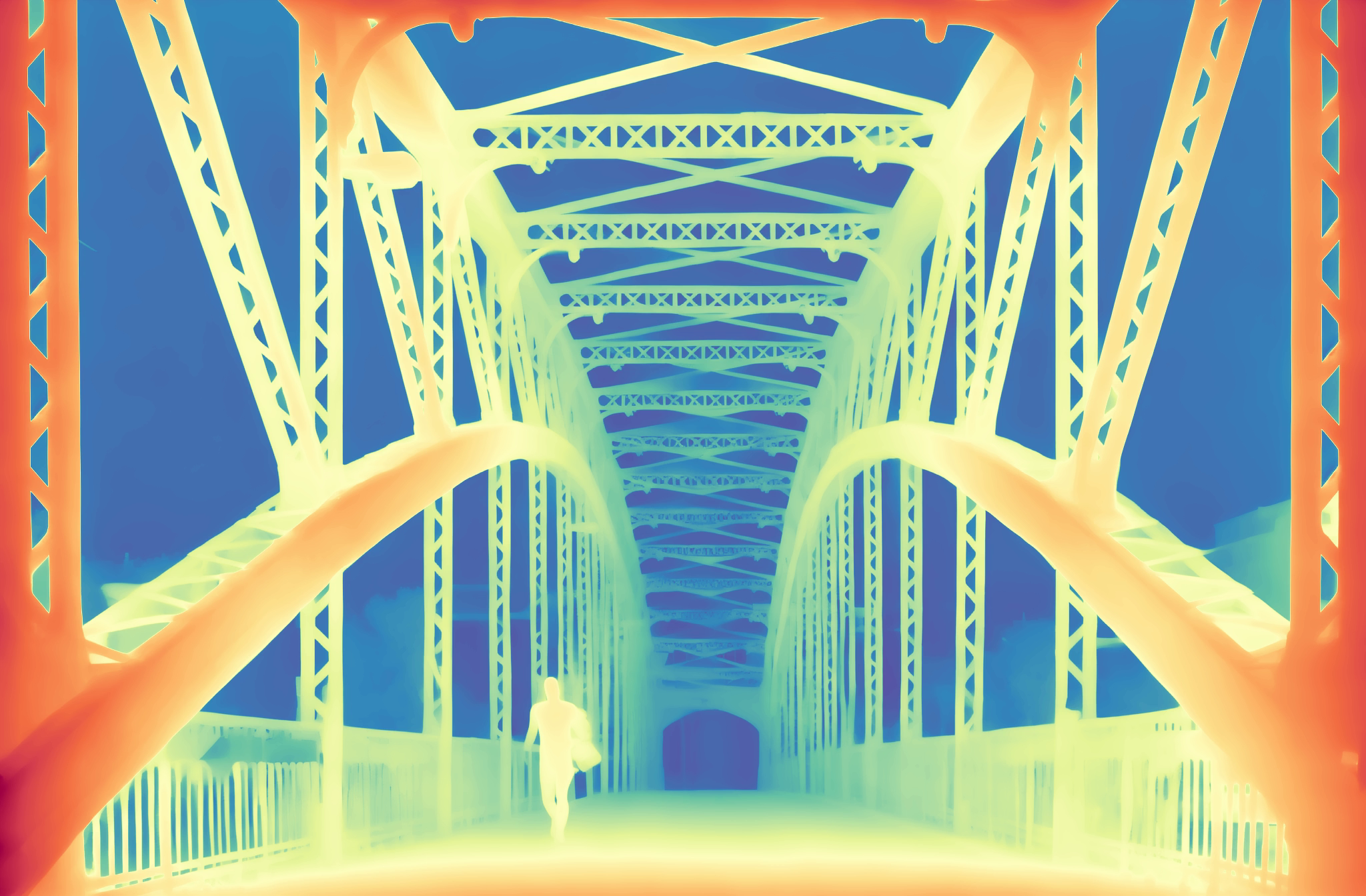
DepthCrafter
Temporally consistent video depth via diffusion — no flicker, no swim.

SAM3 Segmentation
Text or click-prompted mask propagation across an entire clip.
MaMa Matting
Diffusion-based high-quality video alpha — hair, edges, transparency.
MatAnyone2 Matting
Fast recurrent video alpha — the throughput counterpart to MaMa.
SeedVR2 Upscaler
Diffusion-transformer video super-resolution — generative detail, temporally coherent.
How it works
Your host machine doesn't need a GPU. One ComfyUI server can drive many workstations. Image data flows through a shared filesystem as EXR files; orchestration goes over HTTP.
OFX host
Flame, Nuke, Resolve, Fusion, or any other OFX 1.4+ compositor / editor.
AIFX plugin (.ofx bundle)
ComfyUI server
Local or networked. GPU machine recommended.
Custom nodes + model weights
Built on the OpenFX standard
AIFX implements the OpenFX plug-in specification (1.4+), maintained by the Academy Software Foundation. Any host that implements the standard loads and runs these plugins — no per-host patching, no special builds.

Hosts the suite has been used with


AIFX is not affiliated with or endorsed by Autodesk, Foundry, or Blackmagic Design. Logos are the property of their respective owners and used here for compatibility identification only.
Quick start
-
Install the plugins in your OFX host
Grab the latest release for your platform:
-
macOS — the installer (recommended).
Download the
.dmg, launch AIFX Installer.app, and run the guided wizard: it copies the seven bundles, bakes your ComfyUI server URL and shared-folder paths into each one, and clears the macOS quarantine flag. -
Windows / Linux.
Download the archive (Windows x86_64, Linux x86_64), extract it, and drop the seven
.ofx.bundledirectories into the standard OFX plugin directory for your OS.
Any OFX-compatible host picks them up at next launch. Full installation guide →
-
macOS — the installer (recommended).
Download the
-
Set up a ComfyUI server
Install ComfyUI, the required custom nodes for the plugins you want, and the model weights. Configure a shared input/output folder that both the host and the server can read and write.
-
Apply a plugin and render
Plugins appear under the AIFX category in your host. Point the plugin at your server URL and shared-folder paths. Render.
Commercial use: read this first
The plugin code is BSD-3-Clause — freely usable for any purpose. The AI model weights that ComfyUI loads have their own upstream licenses, and several are restricted to non-commercial use. Verify each before shipping a paid project.
| Plugin | Weights license | Paid production? |
|---|---|---|
| Depth Anything V3 | Apache 2.0 (BASE / SMALL / METRIC-LARGE / MONO-LARGE) | Yes |
| SAM3 Segmentation | SAM License | Yes, with conditions |
| SeedVR2 Upscaler | Apache 2.0 | Yes |
| NormalCrafter | Stability AI Non-Commercial (SVD base) | No |
| DepthCrafter | Tencent + Stability AI Non-Commercial | No |
| MaMa Matting | CC BY-NC 4.0 + Stability AI Non-Commercial | No |
| MatAnyone2 Matting | NTU S-Lab License 1.0 (non-commercial) | No |
The project ships no weights — users download from upstream directly. R&D, evaluation, and personal use are permitted across all plugins. Each plugin page lists exact license terms and citations.
Learn more
Installation
Per-OS plugin install and bundle paths.
ComfyUI server setup
The full guide to the model server side.
Workflow customization
Replace or extend the ComfyUI workflows.
Configuration & defaults
Point the plugins at your studio's ComfyUI server and shared paths.
Troubleshooting
Common errors and fixes.
Architecture
For contributors and advanced users.
Plugin reference
One page per plugin with parameters and citations.